The DMS Imperative
Why Enterprise Document Management Demands a Better Solution
The SAP Database Storage Challenge
Organizations running SAP face escalating document storage challenges: tens of thousands of purchase orders, invoices, technical drawings, quality certificates, compliance documents, and engineering specifications—all requiring secure storage and instant access. Storing these documents in the SAP database creates multiple problems:
- Database Bloat: Large files (CAD drawings, high-resolution images, video) consume massive database space, degrading performance
- Storage Cost Escalation: SAP database storage costs 10-20x more than file-based storage solutions like SharePoint or cloud storage
- Backup Window Impact: Larger databases extend backup and recovery windows, increasing downtime risk and backup infrastructure costs
- Performance Degradation: Heavy document loads impact transaction response times, user productivity, and batch job processing
- Archive Complexity: SAP DMS content server lacks long-term archiving capabilities, complicating compliance and retention requirements

The Business Impact
These technical challenges create tangible business consequences. Organizations impose document upload restrictions, frustrating users who need to attach critical files to SAP transactions. IT teams spend excessive time managing database growth, optimizing storage, and addressing performance complaints. Finance departments face escalating infrastructure costs—database licensing, storage hardware, and backup solutions—that deliver no business value. Compliance teams struggle with retention policies when long-term archiving isn't adequately addressed.
The SharePoint Opportunity
Most enterprises already have Microsoft 365 with SharePoint, which provides substantial, cost-effective storage that's underutilized. SharePoint offers enterprise-grade document management—version control, retention policies, compliance features, collaboration tools—that SAP DMS cannot match.
The challenge: how to integrate SharePoint with SAP without disrupting users or modifying SAP standard functionality.
The MOIT DMS Solution
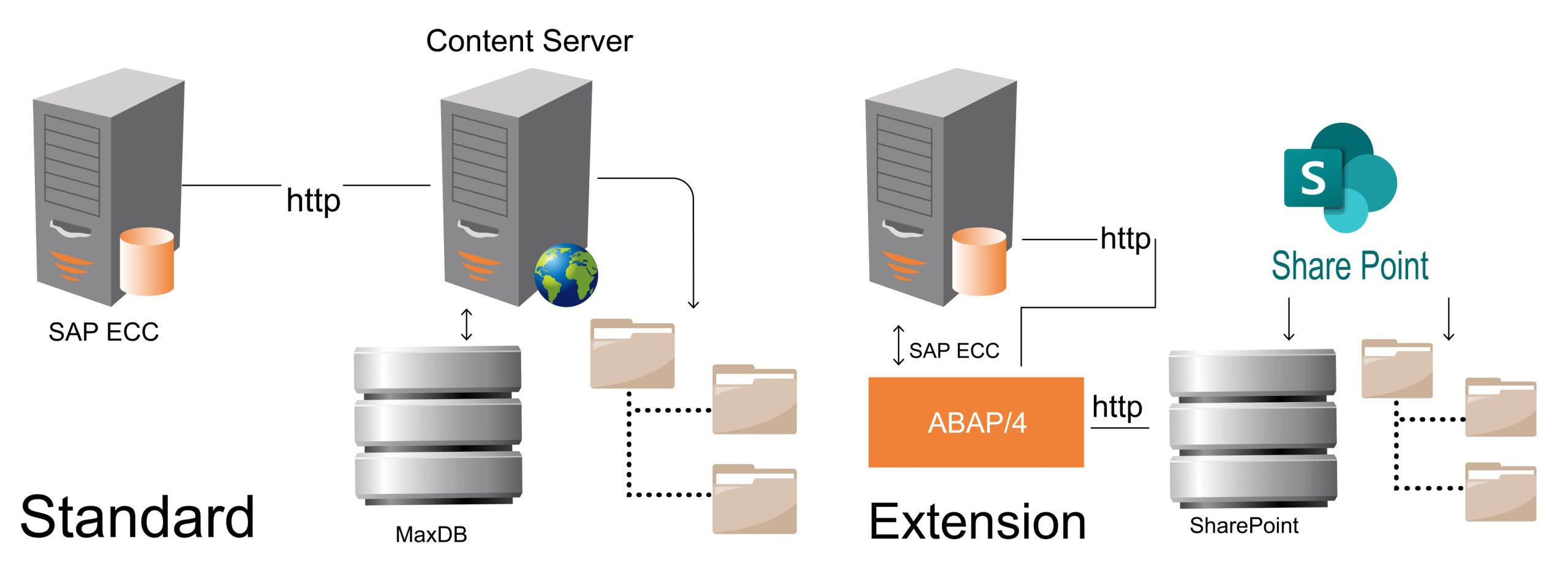
MOIT's Document Management Service addresses this dilemma through intelligent integration: SAP users continue working exactly as before—creating attachments through standard GOS functionality—while documents are routed transparently to SharePoint rather than the SAP database. SAP standard remains unmodified, ensuring supportability and upgrade compatibility.
The result: unlimited document storage at minimal cost, improved SAP performance, simplified backup operations, and long-term archiving capabilities—all without changing how users interact with SAP.
What Is SAP DMS With Sharepoint Integration
Seamless Integration Extending SAP Without Modification
Solution Overview
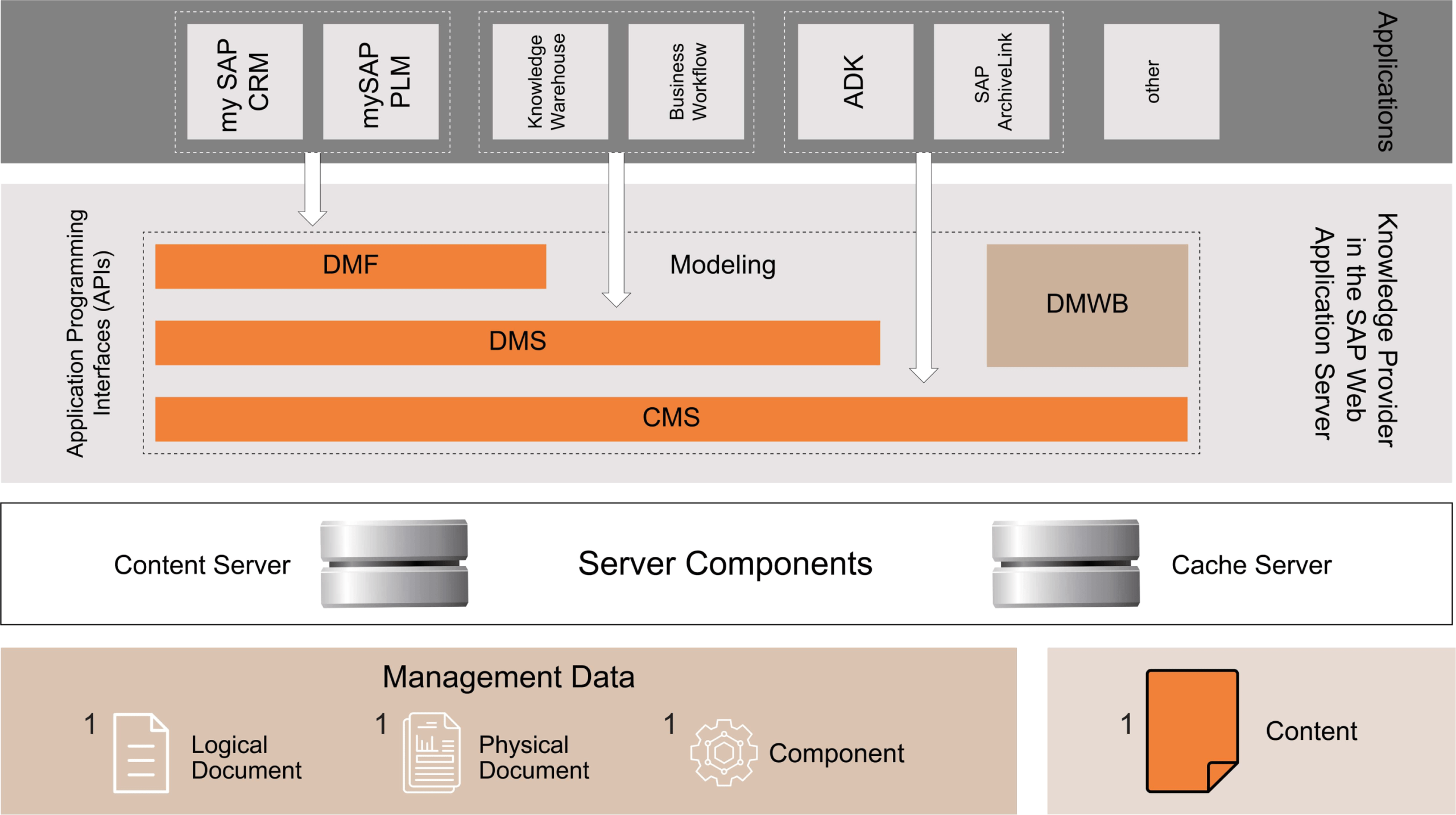
MOIT's Document Management Service extends SAP DMS by using Microsoft SharePoint as the external content repository, replacing SAP database storage for business and workplace documents. The solution leverages SAP's Knowledge Provider (KPro) infrastructure—specifically the Document Management Service component within SAP Web Application Server—which manages documents according to application-specific content models while storing actual file content externally.
Technical Architecture
Custom ABAP HTTP Handler
This core component intercepts document operations between the SAP Document Management System (DMS) and the content repository. This custom handler provides fine-grained control over document creation, reading, updating, and deletion by routing requests to SharePoint rather than to the SAP database or the standard content server.
Microsoft Graph API Integration
OAuth authentication ensures secure access for every HTTP request to SharePoint. Graph API provides comprehensive document management capabilities—upload, download, metadata management, version control—within SharePoint Online or on-premise SharePoint Server environments.
GOS (Generic Object Services) Integration
Documents created as attachments through standard SAP transactions using GOS functionality. Users experience no change—same attachment icon, same create/view/delete workflows—but documents are routed transparently to SharePoint storage.
Content Repository Configuration
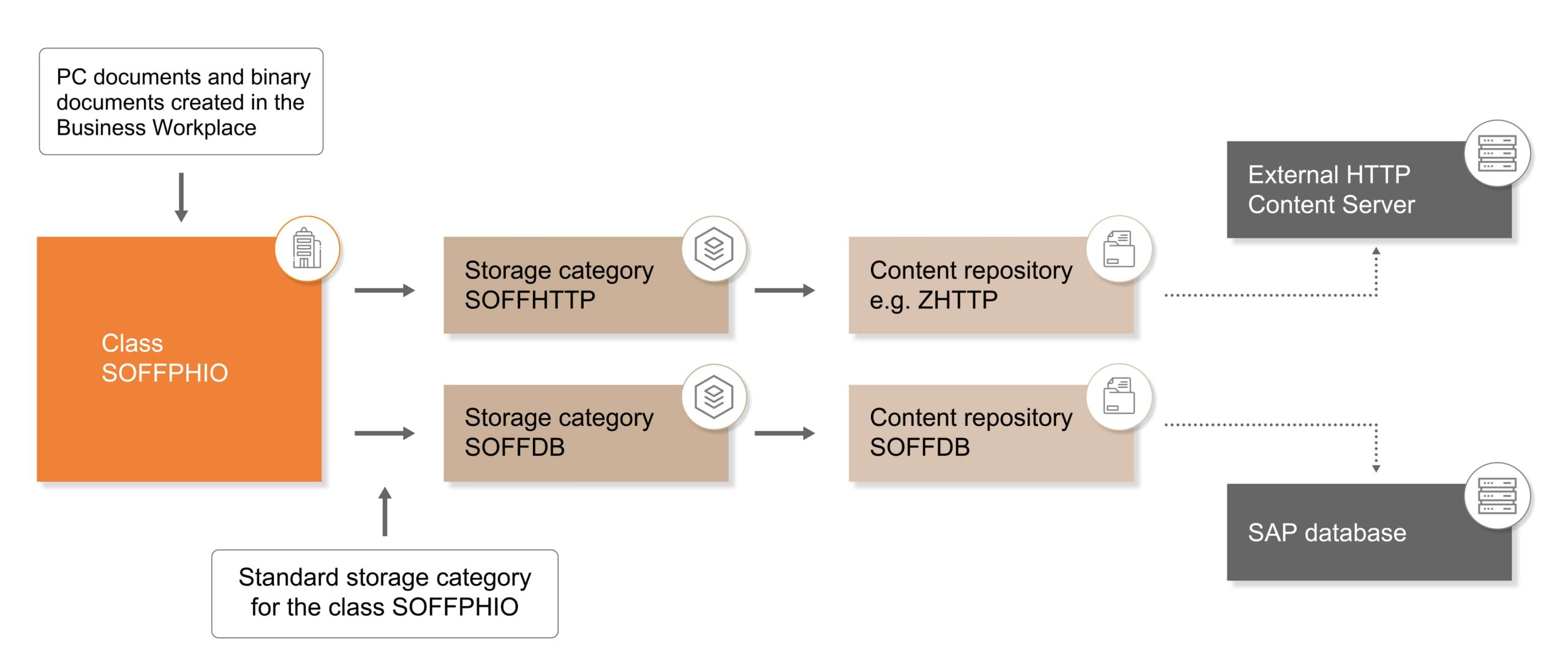
A custom content category configured in the transaction OACT is set to use SharePoint as external storage. Organizations can maintain multiple content repositories—SAP database for specific document types, SharePoint for others—providing flexibility for phased migration or selective storage strategies.
SAP Standard Preservation
Critical principle: zero modifications to SAP standard DMS functionality. The solution extends SAP's architecture through supported extension points (custom HTTP content repository, ICF services, and content category configuration). This approach ensures continued SAP support, seamless upgrades, and compatibility with future SAP innovations. No transport dependencies on SAP standard objects, no modification adjustments during patches, no risk to SAP support contracts.
Deployment Flexibility
Organizations can deploy the solution in multiple configurations:
- Direct integration for cloud-based SAP and SharePoint Online,
- SAP Cloud Connector for on-premise SAP connecting to SharePoint Online,
- SAP Integration Suite/BTP Destination Services for complex hybrid landscapes,
- On-premise to on-premise integration for organizations with data sovereignty requirements. Each deployment model maintains the same user experience and functional capabilities.
DMS Capabilities & Solution Components
Comprehensive Features Delivering Enterprise Document Management
Seamless SAP Integration
Users can create, view, and delete files directly from SAP transactions using familiar GOS attachment functionality, ensuring a zero-learning-curve and immediate adoption across the enterprise.
Key Benefits
- Zero User Training Required
Standard GOS functionality preserved users' work exactly as before, with no additional steps or new interfaces. - 100% SAP Transaction Coverage
Works across all SAP modules—MM purchase orders, SD sales orders, QM quality notifications, PM work orders, FI invoices - Immediate User Adoption
Transparent integration eliminates change-management challenges and user resistance to new systems.
Solution Components
- GOS Services Extension
Extends standard attachment services (Create, Display, List, Delete) to route operations through a custom HTTP handler to SharePoint - SAP Authorization Integration
Respects SAP authorization objects—users with authorization to attach documents in SAP can attach documents; unauthorized users cannot - Metadata Synchronization
SAP DMS metadata (document class, version, status, business object links) is maintained in the SAP database; file content is stored in SharePoint with synchronized metadata tags
Comprehensive File Type Support
Support for diverse document formats meeting varied business needs—from office documents and images to technical drawings and specialized industry formats.
Key Benefits
- Universal Format Support
PDF, Excel, Word, PowerPoint, JPEG, PNG, DWG (AutoCAD), DXF, TIFF, MSG (Outlook emails), ZIP archives, and more - Large File Handling
No practical file size limits—store multi-gigabyte CAD assemblies, video files, and high-resolution technical documentation - Industry-Specific Format Support
Manufacturing: CAD drawings, Engineering: technical specs, Life Sciences: regulatory submissions, Finance: signed contracts
Solution Components
- MIME Type Detection:
Automatic file type identification and appropriate handling for each format - Binary Transfer Optimization:
Efficient handling of large files through chunked uploads and streaming downloads - Format Validation:
Configurable rules for allowed file types, size limits, and naming conventions per content repository
System Integrity Preservation
The solution follows standard SAP DMS architecture patterns, extending storage capabilities to SharePoint without compromising SAP system integrity, supportability, or the upgrade path.
Key Benefits
- SAP Support Maintained
Zero SAP standard modifications ensure continued SAP support—no risk to support contracts or warranty. - Seamless SAP Upgrades
Solution compatible with SAP ECC, S/4HANA, and future SAP releases—no modification adjustments during upgrades - Audit Trail Compliance
Complete audit trail maintained in SAP—who attached the document, when, which business object—supporting SOX and GxP compliance
Solution Components
- Extension-Only Architecture:
Uses SAP-provided extension mechanisms (HTTP content repository, custom ICF services) rather than modifying standard objects - Backward Compatibility:
Works with existing DMS documents—organizations can maintain SAP database storage for legacy documents while routing new documents to SharePoint - Rollback Capability:
Easy switch between SharePoint and SAP database storage by changing content repository configuration—no data migration required
Performance Optimization & Cost Reduction
External content server architecture improves SAP system performance while dramatically reducing infrastructure costs compared to SAP database storage.
Key Benefits
- 80-90% Storage Cost Reduction
SharePoint storage costs $0.20/GB, while SAP database storage costs $2-5/GB—10-25x cost savings for document storage. - 40-60% Faster Transaction Response
Reduced SAP database size improves query performance, transaction response times, and batch job processing. - 50% Smaller Backup Windows
Excluding documents from SAP database backups reduces backup duration, storage costs, and recovery time objectives. - ROI Within 6-12 Months
One-time implementation cost versus ongoing SAP database licensing, storage, and backup expenses delivers a rapid payback.
Solution Components
- Selective Storage Routing:
Configure different content repositories for other document types—large files to SharePoint, small, frequently-accessed files to SAP if preferred - Caching Strategy:
Intelligent coaching of frequently accessed documents optimizes retrieval performance - Parallel Processing:
Asynchronous uploads for large files prevent SAP transaction delays
Native SharePoint Archiving & Lifecycle Management
Leverage SharePoint's built-in retention policies, compliance features, and archiving capabilities for long-term document management—capabilities not available in standard SAP DMS content server.
Key Benefits
- Automated Retention Policies
SharePoint retention policies automatically enforce document lifecycle—retain for 7 years, then archive or delete per compliance requirements. - Version Control & History
SharePoint native versioning maintains a complete document history—what changed and when—supporting audit and compliance needs. - eDiscovery & Legal Hold
The Microsoft 365 Compliance Center provides eDiscovery and legal hold capabilities for litigation support.
Solution Components
- Tiered Storage Integration:
Automatic migration to Azure Archive Blob Storage for long-term retention at minimal cost - Compliance Tagging:
SharePoint metadata tags enable classification-based retention (e.g., 'Financial Records' = 7 years, 'Engineering Drawings' = 10 years) - Disposition Workflows:
Automated workflows for document review and approval before deletion at the end of the retention period
MOIT'S DMS Implementation Approach
Rapid Implementation with Minimal Disruption
Quick Turnaround Time
Standard implementation completes in 2-4 weeks from project kickoff to production deployment. A phased approach allows you to start with a single module or document type, then expand the scope after validating solution performance and user acceptance.
Minimum External Support Required
DIY-friendly solution with comprehensive documentation, configuration guides, and troubleshooting procedures. MOIT provides implementation assistance, knowledge transfer, and optional ongoing support—but organizations can maintain the solution independently with standard SAP Basis and SharePoint administration skills.
Our 4-Phase Implementation
Assessment & Design (1 week)
Current state analysis, SharePoint environment review, content repository design, integration architecture, pilot scope definition
Configuration & Development (1 week)
SharePoint site setup, custom ABAP HTTP handler deployment, content repository configuration, authorization setup, integration testing
Pilot & Validation (1 week)
Pilot with selected users/transactions, performance validation, user acceptance testing, refinement based on feedback
Production Rollout (1 week)
Production deployment, user communication, hypercare support, monitoring setup, knowledge transfer
Content Migration Support
Optional migration service (currently in development) for organizations with existing DMS documents in the SAP database. Selective migration strategies enable moving large/infrequently accessed documents to SharePoint while retaining frequently accessed documents in SAP to optimize performance.
WHY CHOOSE MOIT
The MOIT Advantage for SAP Document Management
Deep SAP & SharePoint Expertise
19+ years delivering SAP solutions combined with Microsoft 365/SharePoint expertise. Our team understands both SAP DMS architecture and SharePoint document management capabilities, enabling optimal integration design that leverages the strengths of both platforms.
Proven Cross-Industry Implementation
Successfully deployed DMS solutions across manufacturing (CAD drawings, quality certificates), chemicals (safety data sheets, batch records), automotive (supplier documents, engineering changes), and life sciences (regulatory submissions, validation protocols). Industry experience accelerates implementation and reduces risk.
Cost-Effective, One-Time Investment
No annual subscription fees, no recurring licensing costs, just one-time implementation investment. Organizations achieve ROI within 6-12 months by eliminating SAP database storage costs and improving system performance—a cost advantage over commercial DMS solutions or SAP Document Management by OpenText.
SAP Standard Preservation Guarantee
Uncompromising commitment to zero SAP standard modifications. We guarantee solution compatibility with SAP support, seamless upgrades, and alignment with SAP's product roadmap. If SAP releases new DMS capabilities, your solution benefits without modification.
Flexible Deployment Options
Support for diverse IT landscapes: cloud-to-cloud (SAP S/4HANA Cloud + SharePoint Online), hybrid (on-premise SAP + SharePoint Online via Cloud Connector), fully on-premise (SAP ECC + SharePoint Server), or BTP-integrated (Integration Suite + Destination Services). Single solution adapts to your infrastructure requirements.